
How do I cancel my Subscription?Updated 2 months ago
We're sorry to hear you're considering canceling your Canopy subscription.
For Replacement Filter Subscriptions, please note we recommend changing filters regularly for optimal performance.
If you're canceling a Premium Aroma Kit Subscription, remember we're always releasing new fragrances! Stay updated by subscribing to our mailing list at the bottom Canopy homepage.
You can also adjust your subscription by skipping or rescheduling orders through your account.
If you've received two refill shipments, you can cancel your subscription on your own from a computer. From your Account page in the top right select "More," and then click "Cancel." This will take you through our cancellation flow.
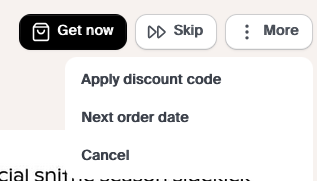
Please keep in mind that this will not cancel any orders already created within your subscription.
If you haven't received your first two subscription refills yet the cancel option will not be available on your account. When you first purchased your unit you received a discount on your initial purchase in association with a subscription commitment, Canopy generally requires that you receive two refills prior to canceling or changing your subscription.
If you need to get in touch with our Customer Experience team directly, please submit your request through our contact form here.
When you're ready reactivate your subscription you can learn how to do that here.
Note: Canceling your subscription will result in clearing your full bank of Canopy Credits, this action cannot be undone. The above steps will not be available on a mobile device.